1. kind란
Kind is a tool for running local Kubernetes clusters using Docker container “nodes”.
kind was primarily designed for testing Kubernetes itself, but may be used for local development or CI.
kind is a CNCF certified conformant Kubernetes installer
kind는 Docker container "nodes"를 사용하여 local Kubernetes cluster를 실행하기 위한 도구이다. 주로 쿠버네티스 자체를 테스트하기 위해 설계되었지만 로컬 개발이나 CI에 사용할 수도 있다.
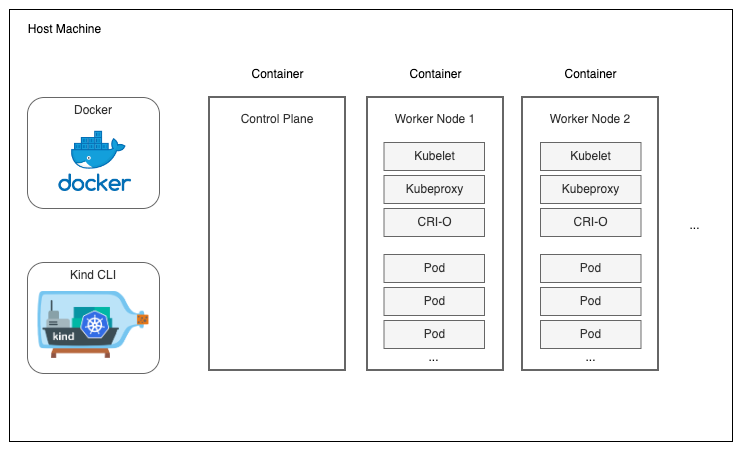
kind를 사용하여 테스트용 vm 안에서 클러스터를 쉽게 구성할 수 있다.
아래 그림과 같이 Container 안에 k8s 각 Node들이 구성되어 있다고 생각하면 될 것 같다.
2. 사용 환경 setup
* 테스트 환경($cat /etc/*release*) : Ubuntu 20.04.6 LTS
2-1. Docker install
https://docs.docker.com/engine/install/ubuntu/
# Add Docker's official GPG key:
sudo apt-get update
sudo apt-get install ca-certificates curl
sudo install -m 0755 -d /etc/apt/keyrings
sudo curl -fsSL https://download.docker.com/linux/ubuntu/gpg -o /etc/apt/keyrings/docker.asc
sudo chmod a+r /etc/apt/keyrings/docker.asc

# Add the repository to Apt sources:
echo \
  "deb [arch=$(dpkg --print-architecture) signed-by=/etc/apt/keyrings/docker.asc] https://download.docker.com/linux/ubuntu \
  $(. /etc/os-release && echo "$VERSION_CODENAME") stable" | \
  sudo tee /etc/apt/sources.list.d/docker.list > /dev/null
sudo apt-get update

# Install the docker packages
sudo apt-get install docker-ce docker-ce-cli containerd.io docker-buildx-plugin docker-compose-plugin

# Verify that the Docker Engine installation is successful by running the hello-world image.
sudo docker run hello-world

# Add your user to the docker group.
# Can use docker without root. (you have to reconnection to apply this changes.)
sudo usermod -aG docker $USER

# restart
sudo systemctl restart docker
2-2. kind install on linux
https://kind.sigs.k8s.io/docs/user/quick-start/
# For AMD64 / x86_64
[ $(uname -m) = x86_64 ] && curl -Lo ./kind https://kind.sigs.k8s.io/dl/v0.23.0/kind-linux-amd64
# For ARM64
[ $(uname -m) = aarch64 ] && curl -Lo ./kind https://kind.sigs.k8s.io/dl/v0.23.0/kind-linux-arm64

chmod +x ./kind
sudo mv ./kind /usr/local/bin/kind
2-3. kubectl install
https://kubernetes.io/docs/tasks/tools/install-kubectl-linux/
# Install using snap package manager
snap install kubectl --classic
kubectl version --client
2-4. ingress nginx install (for kind)
https://kind.sigs.k8s.io/docs/user/ingress/
cluster 생성 시 ingress controller를 사용하도록 생성할 예정이기 때문에, kind용 ingress nginx를 설치해준다.
kubectl apply -f https://raw.githubusercontent.com/kubernetes/ingress-nginx/main/deploy/static/provider/kind/deploy.yaml
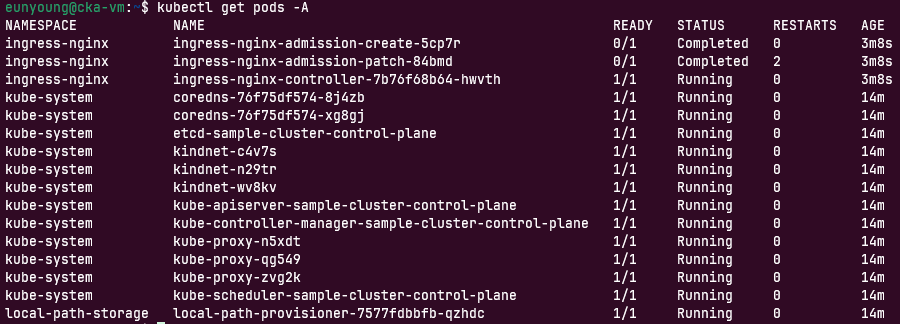
2-5. 셋팅이 완료되면
아래와 같이 pod들이 구성된다.
3. kind로 cluster 구성
3-1. 클러스터 생성
1. master node 1개, worker node 2개로 구성하였다.
2. node의 container image 버전을 지정하여 특정 Kubernetes 버전을 사용하도록 설정할 수 있으며, 여기서는 k8s 1.29.2 버전을 사용하도록 셋팅하였다. (--image kindest/node:v1.29.2)
사용 가능한 버전은 https://github.com/kubernetes-sigs/kind/releases 에서 확인 가능하다.
3. ingress controller를 사용하도록 구성하였다.
[클러스터 생성 script]
cat <<EOF | kind create cluster --name=sample-cluster --image kindest/node:v1.29.2 --config=-
kind: Cluster
apiVersion: kind.x-k8s.io/v1alpha4
nodes:
- role: control-plane
  kubeadmConfigPatches:
  - |
    kind: InitConfiguration
    nodeRegistration:
      kubeletExtraArgs:
        node-labels: "ingress-ready=true"
  extraPortMappings:
  - containerPort: 80
    hostPort: 80
    protocol: TCP
  - containerPort: 443
    hostPort: 443
    protocol: TCP
- role: worker
- role: worker
EOF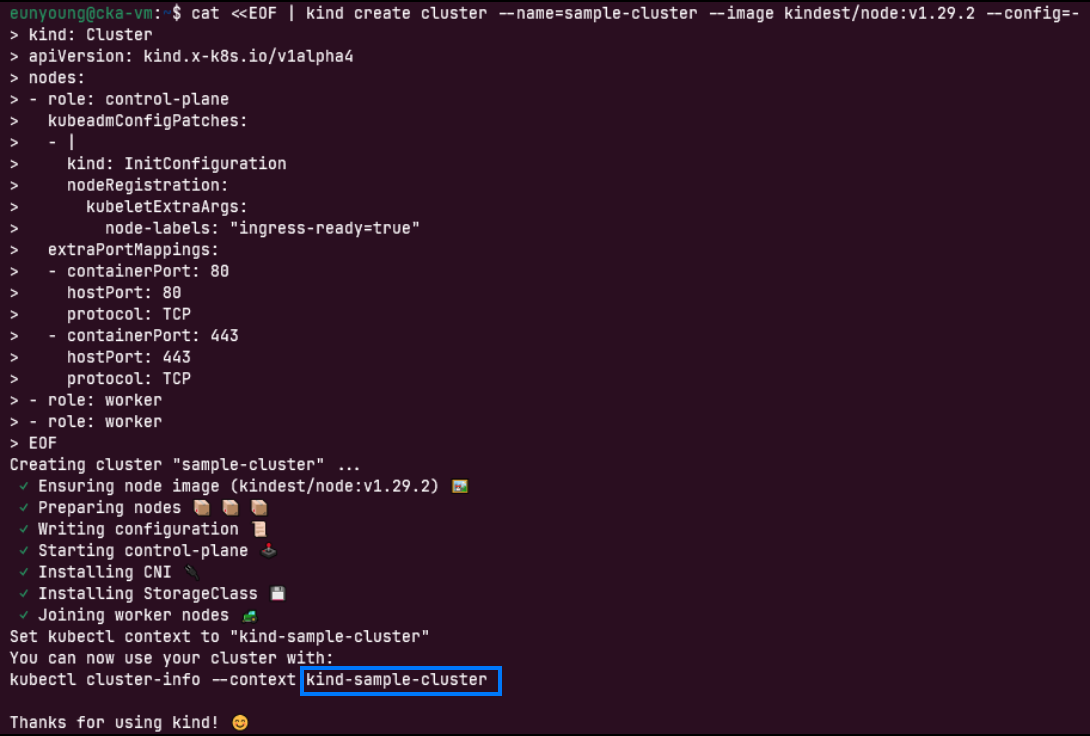
* 추가 작업
kind로 cluster를 생성하면 kubeconfig context의 이름에 "kind-"가 붙어 셋팅된다. (위 이미지 파란색 박스)
아래 명령어를 사용하여 "kind"를 빼고 내가 생성한 cluster name으로 context name을 변경할 수 있다.
# kubectl config rename-context {변경전} {변경후}
kubectl config rename-context kind-sample-cluster sample-cluster

# context 정보 확인
kubectl config get-contexts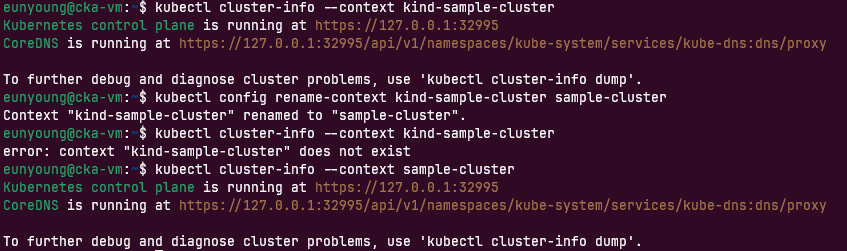

eunyoung@cka-vm:~$ kubectl cluster-info --context kind-sample-cluster
Kubernetes control plane is running at https://127.0.0.1:32995
CoreDNS is running at https://127.0.0.1:32995/api/v1/namespaces/kube-system/services/kube-dns:dns/proxy
To further debug and diagnose cluster problems, use 'kubectl cluster-info dump'.
eunyoung@cka-vm:~$ kubectl config rename-context kind-sample-cluster sample-cluster
Context "kind-sample-cluster" renamed to "sample-cluster".
eunyoung@cka-vm:~$ kubectl cluster-info --context kind-sample-cluster
error: context "kind-sample-cluster" does not exist
eunyoung@cka-vm:~$ kubectl cluster-info --context sample-cluster
Kubernetes control plane is running at https://127.0.0.1:32995
CoreDNS is running at https://127.0.0.1:32995/api/v1/namespaces/kube-system/services/kube-dns:dns/proxy
To further debug and diagnose cluster problems, use 'kubectl cluster-info dump'.
eunyoung@cka-vm:~$ kubectl config get-contexts
CURRENT NAME CLUSTER AUTHINFO NAMESPACE
sample-cluster kind-sample-cluster kind-sample-cluster
3-2. 클러스터 생성 결과 확인
# cluster 정보 조회
kubectl cluster-info

# 클러스터 내의 모든 node 상세 정보 조회
kubectl get nodes -o wide

# 모든 resource 조회
kubectl get all -A

# kind로 생성된 cluster 정보 조회
kind get clusters

# 실행 중인 모든 docker container 목록 조회
docker ps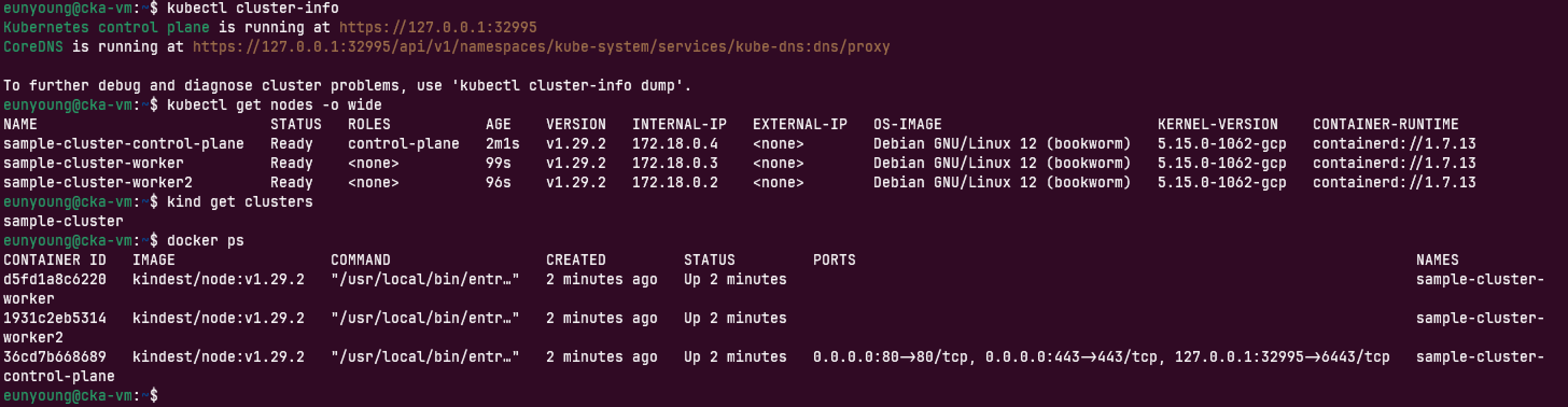
eunyoung@cka-vm:~$ kubectl cluster-info
Kubernetes control plane is running at https://127.0.0.1:32995
CoreDNS is running at https://127.0.0.1:32995/api/v1/namespaces/kube-system/services/kube-dns:dns/proxy
To further debug and diagnose cluster problems, use 'kubectl cluster-info dump'.
eunyoung@cka-vm:~$ kubectl get nodes -o wide
NAME STATUS ROLES AGE VERSION INTERNAL-IP EXTERNAL-IP OS-IMAGE KERNEL-VERSION CONTAINER-RUNTIME
sample-cluster-control-plane Ready control-plane 2m1s v1.29.2 172.18.0.4 <none> Debian GNU/Linux 12 (bookworm) 5.15.0-1062-gcp containerd://1.7.13
sample-cluster-worker Ready <none> 99s v1.29.2 172.18.0.3 <none> Debian GNU/Linux 12 (bookworm) 5.15.0-1062-gcp containerd://1.7.13
sample-cluster-worker2 Ready <none> 96s v1.29.2 172.18.0.2 <none> Debian GNU/Linux 12 (bookworm) 5.15.0-1062-gcp containerd://1.7.13
eunyoung@cka-vm:~$ kind get clusters
sample-cluster
eunyoung@cka-vm:~$ docker ps
CONTAINER ID IMAGE COMMAND CREATED STATUS PORTS NAMES
d5fd1a8c6220 kindest/node:v1.29.2 "/usr/local/bin/entr…" 2 minutes ago Up 2 minutes sample-cluster-worker
1931c2eb5314 kindest/node:v1.29.2 "/usr/local/bin/entr…" 2 minutes ago Up 2 minutes sample-cluster-worker2
36cd7b668689 kindest/node:v1.29.2 "/usr/local/bin/entr…" 2 minutes ago Up 2 minutes 0.0.0.0:80->80/tcp, 0.0.0.0:443->443/tcp, 127.0.0.1:32995->6443/tcp sample-cluster-control-plane
4. 클러스터 삭제
kind delete 명령어로 cluster를 삭제한다.
# kind delete cluster {-n or --name} {cluster name}
kind delete cluster -name sample-cluster
kind delete 명령어로 cluster를 삭제해본 결과, 클러스터는 삭제되지만 kubeconfig 파일에 있는 context 정보는 자동으로 삭제되지 않는 것을 확인할 수 있었다.
삭제 후 3개의 명령어로 확인했을 때 (2), (3) 정보는 정상적으로 삭제되었으나 (1) context 정보는 남아있었다.
(1) kubectl config get-contexts / (삭제) kubectl config delete-context {clulster-name}
(2) kubectl config get-clusters / (삭제) kubectl config delete-cluster {clulster-name}
(3) kubectl config get-users / (삭제) kubectl config unset users.{clulster-name}
kubectl config delete-context 명령어까지 수행하여 context 정보도 삭제해준다.
#kubectl config delete-context {context name}
kubectl config delete-context sample-cluster
참고자료
kind
kind is a tool for running local Kubernetes clusters using Docker container “nodes”. kind was primarily designed for testing Kubernetes itself, but may be used for local development or CI. If you have go 1.16+ and docker, podman or nerdctl installed go
kind.sigs.k8s.io
liveBook · Manning
livebook.manning.com
[Kubernetes] kubectl 명령어
kubectl 명령어중 자주 사용하게 될 것들을 정리해놓고 참고하기로 했다. kubernetes cluster, context, user의 정보 → kubectl config view 컨텍스트 확인 → kubectl config get-contexts 컨텍스트 변
velog.io
'Cloud > kubernetes' 카테고리의 다른 글
| Kubespray로 쿠버네티스 설치하기, 클러스터 구성하기 (0) | 2024.07.29 |
|---|---|
| kubernetes 명령어 (2) | 2024.06.28 |